ArcGIS Online (AGO) login process using your UConn email
If you do not have a UConn issued AGO account, email mrozinski@uconn.edu to request one. To verify your affiliation with UConn, all requests for AGO accounts should be sent from your UConn email (with @uconn.edu at the end).
Access to ArcGIS Pro and ArcGIS Online are made available through your UConn email. On the initial ESRI Sign In screen, select the option to sign in using “Your ArcGIS organization’s URL“. For the organization URL, enter “connecticut” in the box.
Step 1:
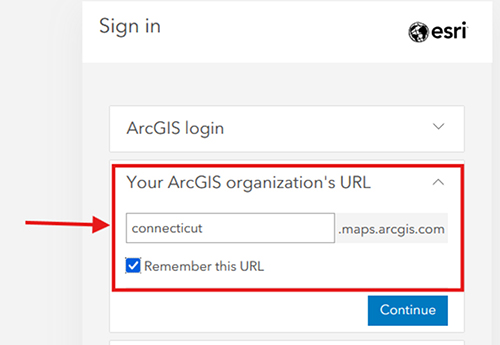
The most common problem is not selecting to use Your ArcGIS Organization’s URL to login.
Step 2.
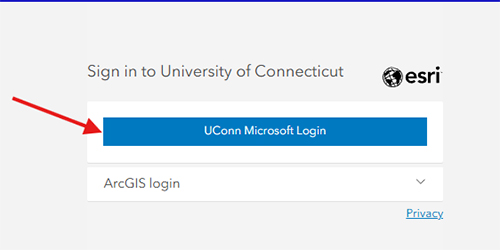
Step 3.
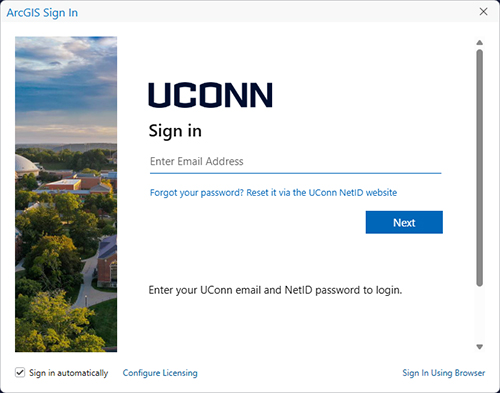
Step 4. You should now be redirected back to the ESRI function you were using before the login process started
If you cannot remember your UConn email password, follow online recovery instructions at https://netid.uconn.edu.
Contact Rich Mrozinski if you experience problems logging into the ESRI portal with your UConn email.
updated: 09-16-2025